
Navigating Tableau Data Sources: Your Gateway to Insights

- nicerev
- 06 Jan, 2026
Welcome to the world of Tableau data sources, where raw data transforms into actionable insights with just a few clicks. In this blog, we’ll explore the intricacies of Tableau data sources, empowering you to harness the full potential of your data and drive informed decision-making.
Whether you’re a seasoned data analyst or a novice explorer, understanding Tableau data sources is essential for unlocking the true power of Tableau’s visualization and analysis capabilities.
Understanding Tableau Data Sources:
Connectivity Options: Tableau offers a wide range of connectivity options, allowing you to connect to diverse data sources including databases, spreadsheets, cloud services, and web data connectors. Whether your data resides on-premises or in the cloud, Tableau provides seamless connectivity to bring your data to life.
Relationship: Relationships in Tableau provide a dynamic and flexible approach to merging data from various tables for analysis. By leveraging relationships, you can effortlessly uncover insights hidden within datasets, without the complexity of traditional ETL processes.
Data Preparation: Tableau’s data preparation capabilities empower you to clean, transform, and shape your data directly within the Tableau environment. From renaming fields to pivoting data and creating calculated fields, Tableau’s intuitive interface makes it easy to prepare your data for analysis without the need for external tools.
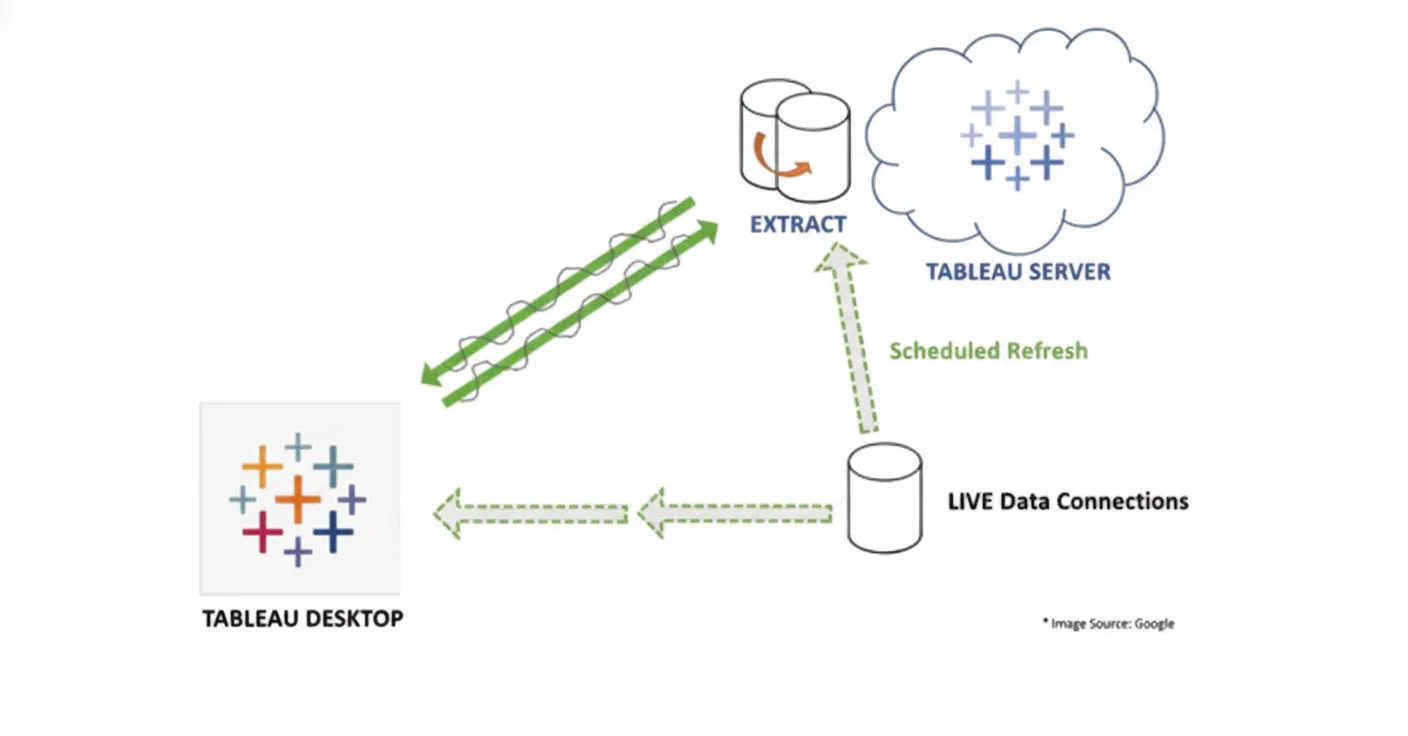
Live vs. Extracts: Tableau offers two primary data connection types: live connections and extracts. Live connections enable you to analyze data in real- time directly from the source, ensuring that your analysis reflects the most up-to- date information. Extracts, on the other hand, allow you to extract a subset of your data into Tableau’s proprietary data format for faster performance and offline analysis.
Optimizing Tableau Data Sources:
Data Source Filters: Tableau’s data source filters allow you to filter data at the source level, ensuring that only relevant data is brought into your analysis. By applying data source filters, you can improve performance and streamline your analysis by focusing on the most relevant subsets of your data.
Joining and Blending: In Tableau’s data source, at both the physical and logical layers, you can merge data by joining and blending from various sources. With Tableau’s flexible integration options, whether you’re joining based on common fields or blending at the visualization level, you can seamlessly bring your data together.
Optimization Techniques: To optimize Tableau data sources for performance and efficiency, consider techniques such as data source caching, incremental data refreshes, and optimizing data extracts. By implementing these optimization techniques, you can ensure that your Tableau dashboards and visualizations deliver optimal performance even with large datasets and complex analyses.
Conclusion:
In conclusion, Tableau data sources are the foundation of your data analysis journey, providing the gateway to unlocking insights that drive business success. By understanding Tableau’s connectivity options, data preparation capabilities, and optimization techniques, you can harness the full power of your data and drive informed decision-making across your organization.
Whether you’re connecting to databases, blending data from multiple sources, or optimizing data sources for performance, Tableau empowers you to unleash the full potential of your data and transform it into actionable insights.
AI solutions partnering with businesses to solve
complex challenges and thrive in the age of Data & AI.

Neeraj Deval
VP Professional Services
Recent Blogs


